Uptime and browser scenario monitoring

The site returns 200.The customer still cannot pay.

Ordinary monitoring pings an address and shows green. Every few minutes Uptimo walks through your whole checkout flow in a real browser, and when a step fails you get a video, a screenshot of that step and the full HAR file. Before the first customer calls.

No card required · Set up in fifteen minutes · Cancel any time

app.uptimo.pl/pulpit
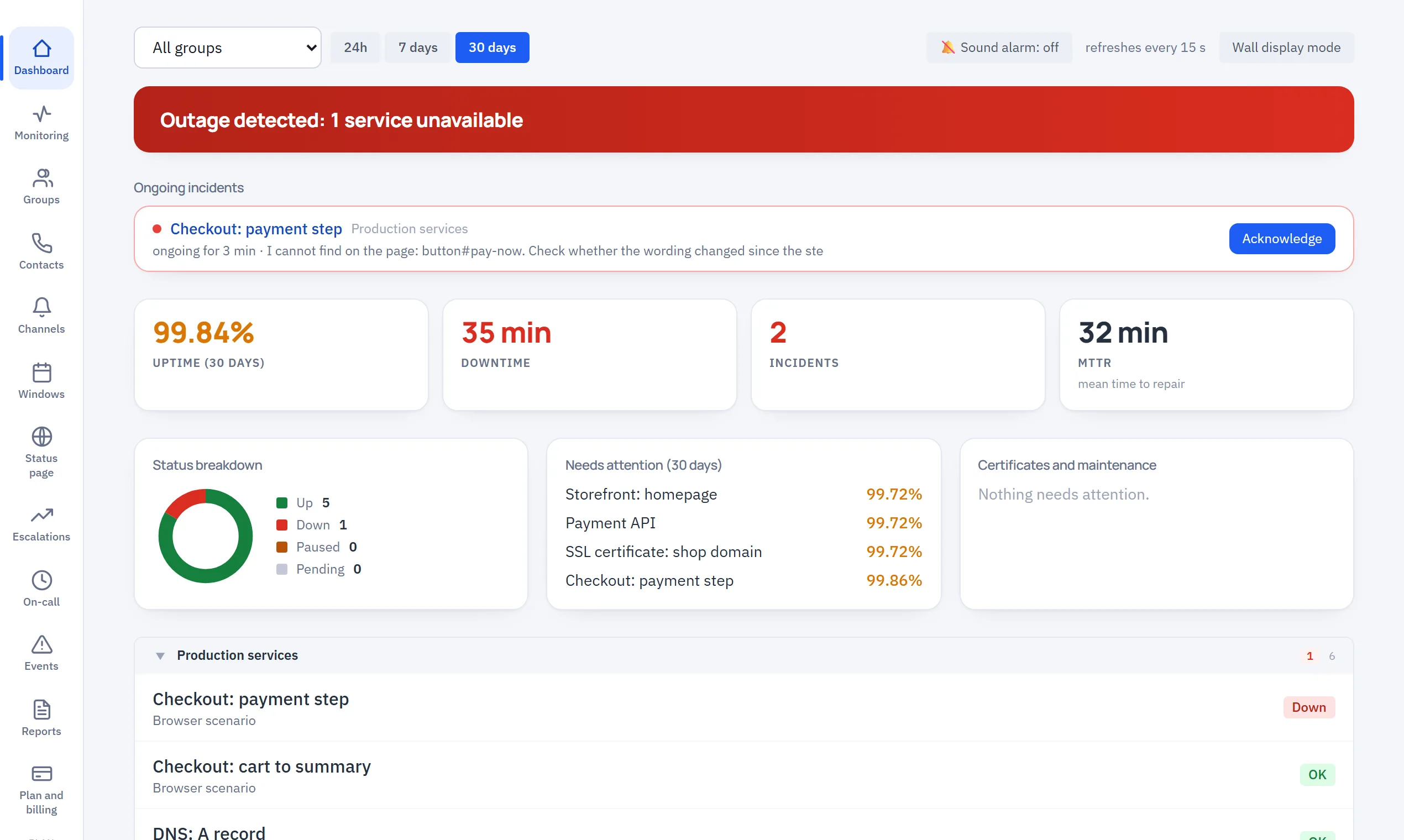
Failure detected: 1 service down
Uptime 30 days
99.94%
Downtime
26min
Incidents
3
MTTR
8min
Response time, all servicesms
shop.example.com2 741
api.example.com/health38
payments.example.comnone
cert · example.com9 days
ns1.example.com11
9
check types
5
alert channels
30 s
shortest interval for lightweight checks
AES-256-GCM
secret encryption
PL / EN
panel, alerts and reports
EU
data centre and data
Before Uptimo

Monitoring says everything is fine. Customers say otherwise.

Tools that only check whether an address responds measure the least important thing. The home page almost always works. The money is lost further down: at login, in the cart, at the payment gateway.

01

You hear about the outage from a customer

The form returns an error, but the server answers 200. Monitoring stays quiet and the complaint arrives by e-mail two hours later.

02

“It does not work” is the whole report

Nobody knows which step, which browser or what time. Half a day goes into reproducing something that already happened.

03

SLA is a promise, not a measurement

The contract says 99.9%. Nobody can show what it really was, or subtract the planned maintenance window.

04

An alert wakes everyone or no one

No escalation and no acknowledgement: either the whole company gets an SMS at 3 a.m., or the only person notified happens to be asleep.

05

The certificate expires on Saturday

The first reminder of the expiry date is the browser warning shown to a customer.

06

Half a day to add a client

An agency with thirty sites clicks through the same configuration thirty times, without roles and without separating clients.

After Uptimo

Uptimo checks the thing you make money on and leaves the evidence.

The same scenario every few minutes, always the same way. If it passes, you know a customer will pass too. If it fails, you have the full material for a fix before anyone has time to report the problem.

Monitoring pings the home page
Uptimo clicks through login, cart and payment like a user
The report says “the site is down”
A video of the run, a screenshot of every step and a HAR file with the requests
SLA estimated by feel
Availability counted to the second, a report every week or every month
One alert to everybody
Step-by-step escalation, “I am on it” acknowledgement, maintenance windows
Certificates tracked in a calendar
A separate SSL/TLS expiry check, well in advance
Everyone sees everything
Four roles, groups per client, audit log
Product

This is what a failure looks like when it can be fixed before lunch

Three screens where you will spend 95% of your time with Uptimo. The rest of the panel exists so that you do not have to look at it.

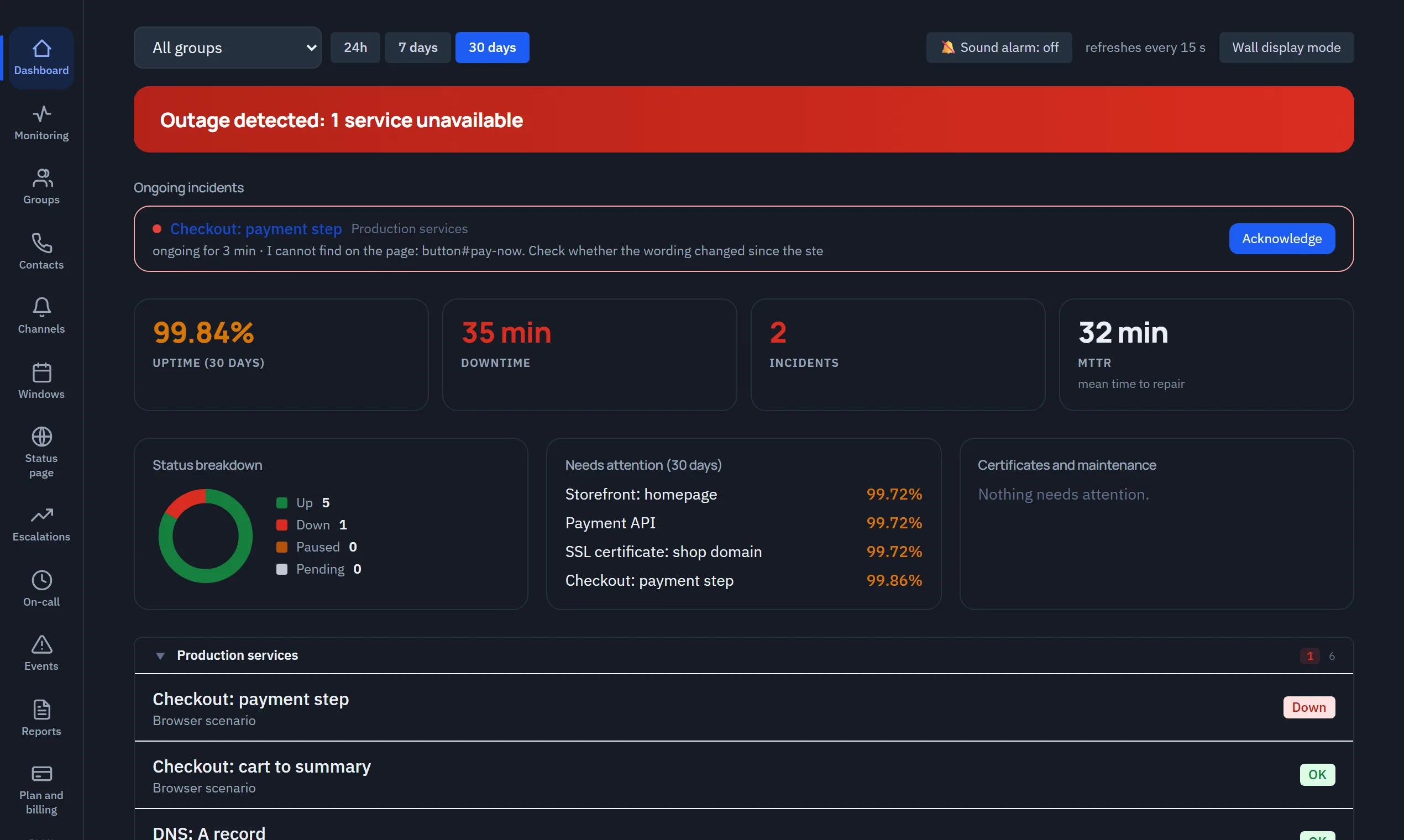
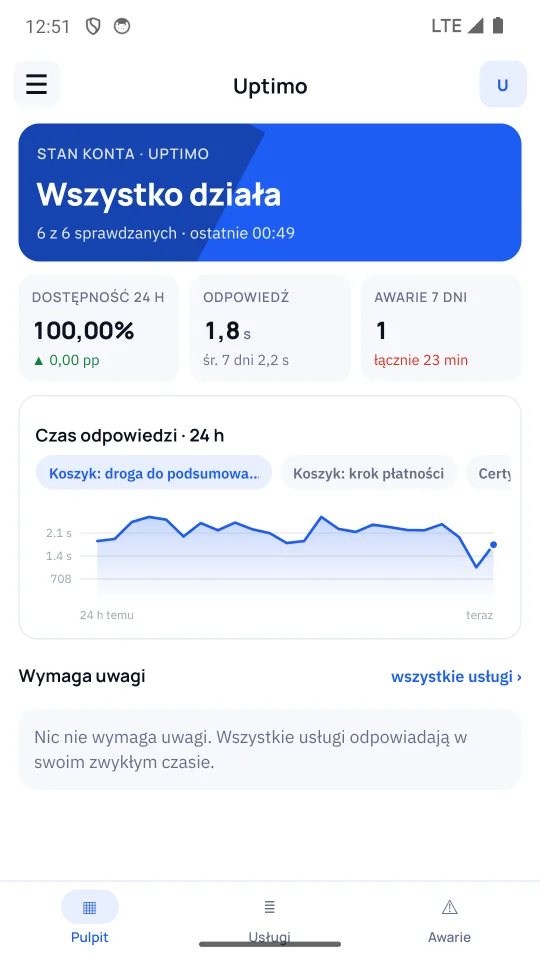
One screen with the state of the whole company

Availability, response time, open incidents and expiring certificates: the last ones we read ourselves from every monitored https address, with issuer and expiry date. Wall mode turns the same view into one readable from across the room, with an audible alarm on a new failure.

What you get out of it

The morning review takes ten seconds instead of a tour of five tools.

app.uptimo.pl/pulpit
Failure detected: 1 service down
Uptime 30 days
99.94%
Downtime
26min
Incidents
3
MTTR
8min
Response time, all servicesms
shop.example.com2 741
api.example.com/health38
payments.example.comnone
cert · example.com9 days
ns1.example.com11
Capabilities

What Uptimo does, what you get from it and why it shows in the result

Browser scenarios

Replays the given steps in a real browser (Playwright): go to, click, fill in, wait, check text. You describe the scenario in plain sentences (“click the ‘Add to cart’ button”) and we run them on your own page, showing the result of every step with a screenshot BEFORE anything is saved.

You monitor the sales process, not just the presence of a server.

A payment failure shows up within minutes, not after the daily sales report.
Video, step screenshots and HAR

On a failed run it saves a recording, a screenshot of every step and a full log of network requests.

You do not have to reproduce the failure. You watch it.

Shorter time to repair, measurable as the MTTR shown on the dashboard.

Nine check types

HTTP, HTTPS, full page with resources and HAR analysis, DNS, ping, TCP port, certificate expiry, scenario.

One tool instead of three: the network layer, the application and the business process.

Fewer licences, one on-call rota, one incident history.

Certificates watched automatically

We read the expiry date and the issuer of the certificate from every monitored https address, without creating a separate check. As many days before the end as you set, a message goes to the recipients of that service.

The only outage visible a month ahead stops depending on somebody's memory.

You do not lose a day of sales to a browser warning about an insecure connection.

Alerts with escalation and acknowledgement

E-mail, Slack, Microsoft Teams, SMS and any webhook with your own headers and message template. Conditions for failure, recovery and a problem that is still going on.

The alert reaches the right person, and the “I am on it” acknowledgement stops the next steps.

Night-time wake-ups only when they are really needed.

SLA and reports

Counts availability, downtime, number of incidents and MTTR. A weekly or monthly report goes out by e-mail per group.

The conversation about service level rests on a measurement, not on an impression.

An argument in negotiations with a client and with a hosting provider.

Maintenance windows independent of SLA

A planned break silences alerts. Excluding the period from SLA calculations is a separate, deliberate decision.

No need to choose between quiet nights and an honest report.

The report stays credible also for the client who reads it.

Roles, groups and audit log

Four roles (Owner, Administrator, Member, Observer), service groups, a record of who changed what. We create accounts on your request. Each person receives a message and sets their own password; we never send passwords by e-mail.

A client or the management board gets visibility without the right to change settings.

An agency serves many clients from one account, without mixing data.

Configuration export and import

The whole monitoring configuration as a file, secrets excluded. Done on request.

Copying a set of checks for the next client takes a minute, not an hour.

The cost of adding a client stops growing linearly.

Use cases

Three situations in which Uptimo pays for itself in the first month

Cart and payment checked more often than once a day

The scenario walks the whole path: product page, add to cart, delivery details, on to the gateway. A text check at the end confirms it really is an order, not an error page with status 200.

  • A broken payment integration caught before daily sales drop
  • Certificate expiry watched automatically, without a separate check
  • A maintenance window for deployments, without false alarms

Exactly what we check in an online shop

How it works

From sign-up to the first alert in one afternoon

01

Create an account

E-mail address and password. No card and no call with a salesperson.

02

Add services

Paste addresses and pick a check type. The first results appear within a minute.

03

Build a scenario

Pick the steps from a list: go to, fill in, click, check text. No code.

04

Decide who needs to know

Channels, conditions, escalation order and quiet hours. You schedule the SLA report once.

Start with the first stepNothing to install. No server access and no code changes needed.
Pricing

You pay for scenarios and frequency, because that is what costs

HTTP, DNS, ping and TCP checks are cheap for us, so their limits are generous. The browser is what costs. That is why the number of scenarios and the interval differentiate the plans. SMS has its own allowance, because it is the only channel priced per message; once it runs out, alerts continue by e-mail and the allowance renews every month. Net prices, in Polish zloty (PLN).

20%

Solo

One site, one person

PLN 0/ month

Free with no time limit. Sensible monitoring of a single site.

  • 3 services
  • Interval from 5 minutes
  • HTTP, HTTPS, DNS, ping, TCP
  • E-mail alerts
  • 5 alert SMS per month
  • 7 days of history
  • Browser scenarios
  • SLA reports
  • Escalations

Start

A small company with one sales site

PLN 119/ month

billed annually · PLN 149 monthly

The first scenario and the full set of alert channels.

  • 15 services
  • Interval from 5 minutes
  • 1 browser scenario
  • Builder: scenario written in plain sentences (10 attempts / month)
  • All channels: Slack, Teams, SMS, webhook
  • 20 alert SMS per month
  • Maintenance windows
  • 30 days of history
  • Multi-step escalations
  • SLA reports
Most popular

Team

A company for which downtime means lost revenue

PLN 319/ month

billed annually · PLN 399 monthly

Full process monitoring plus accountability for every incident.

  • 50 services
  • Interval from 1 minute (scenarios from 5 minutes)
  • 10 browser scenarios
  • 50 alert SMS per month
  • Builder: scenario written in plain sentences (40 attempts / month)
  • Video, step screenshots and HAR on failure
  • Escalations and incident acknowledgement
  • Weekly and monthly SLA reports
  • Roles and audit log
  • 90 days of history

Agency

Maintaining many sites for many clients

PLN 719/ month

billed annually · PLN 899 monthly

One panel, many clients, a separate report for each of them.

  • 150 services
  • Interval from 1 minute (scenarios from 5 minutes)
  • 30 browser scenarios
  • 150 alert SMS per month
  • Builder: scenario written in plain sentences (100 attempts / month)
  • SLA reports in the agency's colours (we upload the logo at onboarding)
  • Groups and client visibility without the right to change
  • Configuration export and import on request
  • 180 days of history

In every plan, including the free one

  • Certificate expiry watched for every monitored https address, without a separate check
  • E-mail alerts on failure and on recovery, unlimited, in every plan
  • A dashboard with availability, response time and incident history
  • Unlimited alert recipients and service groups
  • Monitoring from a location in the European Union

Add-ons for every paid plan

  • Pack of 5 extra scenariosPLN 79 / month
  • Interval shortened to 30 sPLN 129 / month
  • History extended to 365 daysPLN 99 / month

Dedicated instance

A separate instance, your own check location, individually agreed limits, a contractual SLA and support with a defined response time. For organisations that must monitor resources unreachable from the public internet or have compliance requirements.

Net prices in PLN. Monthly or annual billing, VAT invoice. Change or cancel the plan at any time, with no notice period.

Why Uptimo

Four reasons this is not another ping monitor

We check the process, not the address

The browser scenario is not an add-on in the most expensive plan, it is the core of the product. The alternative is a tool that confirms the server is up at the very moment the cart has stopped working.

A failure leaves evidence

Video, a screenshot of every step and HAR are created on their own, only on failure. Nobody has to remember to switch recording on, or wait for the bug to happen again in front of a witness.

A report you can show a client

SLA counted to the second, with a clear distinction between silencing alerts and excluding a period from the calculation. The report goes by e-mail in the language of the recipient's organisation.

Data stays in the European Union

The instance runs on a server in Germany (netcup), inside the European Economic Area. Secrets in the database are encrypted with AES-256-GCM, the session lives in an httpOnly cookie, and scenarios run in an isolated process with no access to the application keys.

Questions

What people ask before they decide

Your blocking question is not here? Write to us. We reply the same working day.

Free tools check whether an address responds. That is useful, but it only catches total outages. Uptimo adds a layer above: it walks the path you make money on and, on failure, leaves a recording and a HAR file. If your downtime costs less than a few hundred zloty a month, stay with the free tool, and take our Solo plan, which is free as well.

No. The Solo plan is free with no time limit, and the 14-day trial of the paid plans does not require a card. You enter payment details only when you decide to stay.

Adding HTTP, DNS or certificate checks takes fifteen minutes. The first checkout scenario usually takes an hour, mostly to walk the path and confirm the steps are stable. There is nothing to install on your side: you set up nothing and maintain nothing.

No. You pick the steps from a list: go to an address, fill in a field, click, wait for an element, check text. That covers login, cart, contact form and search. You can also describe the scenario in plain sentences: the builder runs them on your page and shows a table with the result of every step, screenshot included. You only save what worked in front of you.

In the European Union: the application and the database run on a server in Germany (netcup), and this website separately, on OVHcloud hosting in Poland. Data leaves the European Economic Area only when you deliberately trigger it: the scenario description when generating steps with AI, and the alert text to Slack or Teams if you configure them. The full list is in the privacy policy. Secrets (channel passwords, integration keys) are encrypted with AES-256-GCM, the session lives in an httpOnly cookie with SameSite=Strict, and failure artefacts are available only through a short-lived token limited to a single check. The database has an automatic backup, verified after every dump.

In the standard plans, from one location in the European Union. We do not pretend to run a network of a hundred probes. For monitoring a business process, frequency and scenario fidelity matter, not the number of cities. Additional or private locations are part of a dedicated instance.

We do not block private addresses. That is a deliberate decision, because monitoring your own network is a normal use. For it to work, though, the resource must be reachable from our location. If it is not, you need a dedicated instance on your side of the network.

File import is supported for our own export format. When migrating from another tool, we move the list of checks together with you during onboarding. Usually it is one meeting.

Not yet. It is on the roadmap and we do not want to sell it as ready. Today client visibility is provided by the Observer role and the periodic SLA report sent by e-mail.

You write to us and the plan runs until the end of the paid period. No notice period and no retention call. We will prepare a copy of your configuration for download; just ask for it before the period ends.

Check whether your cart really works

Create an account, build one scenario and leave it for a day. If it finds nothing, that is great: you will know it from a measurement, not from hope.

No card required · Set up in fifteen minutes · Cancel any time